
What you need
- Greens on an iPhone with iOS 26 or later.
- An Apple Watch with watchOS 26 or later. The Greens watch app installs with the iPhone app.
Start the round on your iPhone
Start your round on your phone, then open Greens on your watch. The round appears on the watch within a moment, and from then on you can leave the phone in your bag or the cart.
Yards to the hole
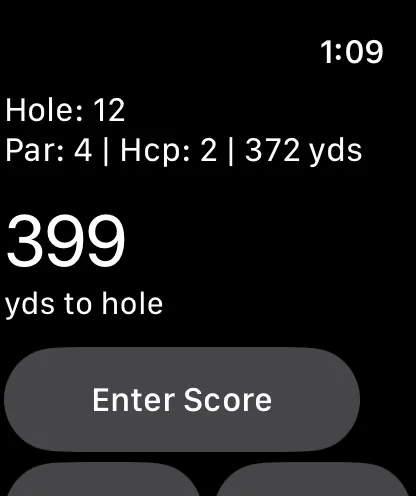
Raise your wrist to see the hole number, its par, its handicap and length, and your live distance in yds to hole. The arrows move between holes. Live distance works on most courses; on holes without GPS data you still get par and length.
Enter your score
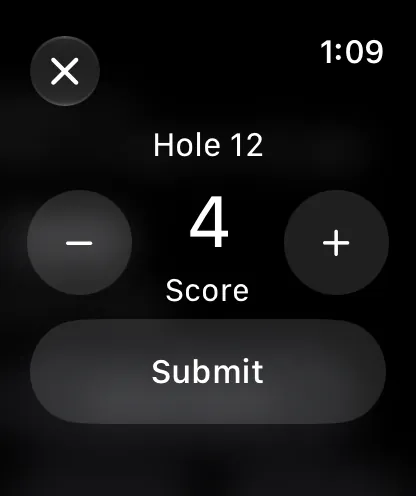
Tap Enter Score. The score starts at par; tap minus or plus to change it, then Submit. Putts, bunkers and drops follow the same way. Only the ones you change are recorded, so if you don't track putts, just tap Submit past them.
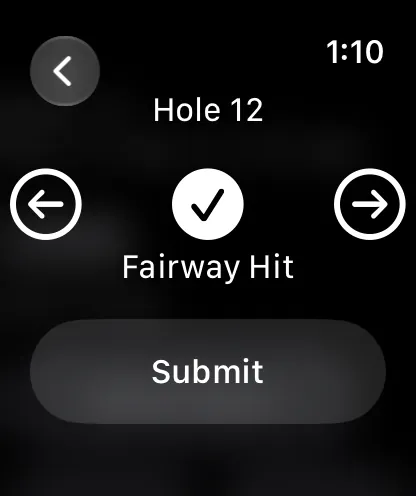
On par 4s and 5s the last step is the tee shot: left, hit or right. Then confirm, and the hole is saved.
Syncing
The watch sends each score to Greens itself, through your iPhone when it's nearby or over Wi-Fi or cellular. If they can't get through, the watch shows how many holes are waiting, such as 2 holes waiting to sync · Retry, and keeps trying. Your scores stay on the watch until they arrive.
Finish on your phone
Once every hole is scored, the watch tells you to finish on your phone. Open the round there and submit it to update your handicap and stats.
Updated November 12, 2026 by the Greens team.