
1. Turn on Use Handicaps
When you set up Match Play, Stroke Play, Skins or Nines, turn on Use Handicaps. Each player confirms their handicap when they join, and Greens scores the game on net scores.
2. How many strokes each player gets
The lowest handicap in the match plays off zero. Everyone else gets the difference between their handicap and that one, rounded down. In a nine-hole match the difference is halved, and rounded down again.
| Handicap | 18 holes | 9 holes |
|---|---|---|
| 4.3 | 0 | 0 |
| 6.8 | 2 | 1 |
| 10.5 | 6 | 3 |
| 15.9 | 11 | 5 |
3. Which holes they fall on
Strokes go on the hardest holes first, by each hole's handicap for your tees: 6 strokes over 18 holes means a stroke on the holes rated 1 to 6. Over nine holes they go on that nine's hardest holes. With more strokes than holes, every hole gets one and the hardest get a second.
4. Read the scoreboard
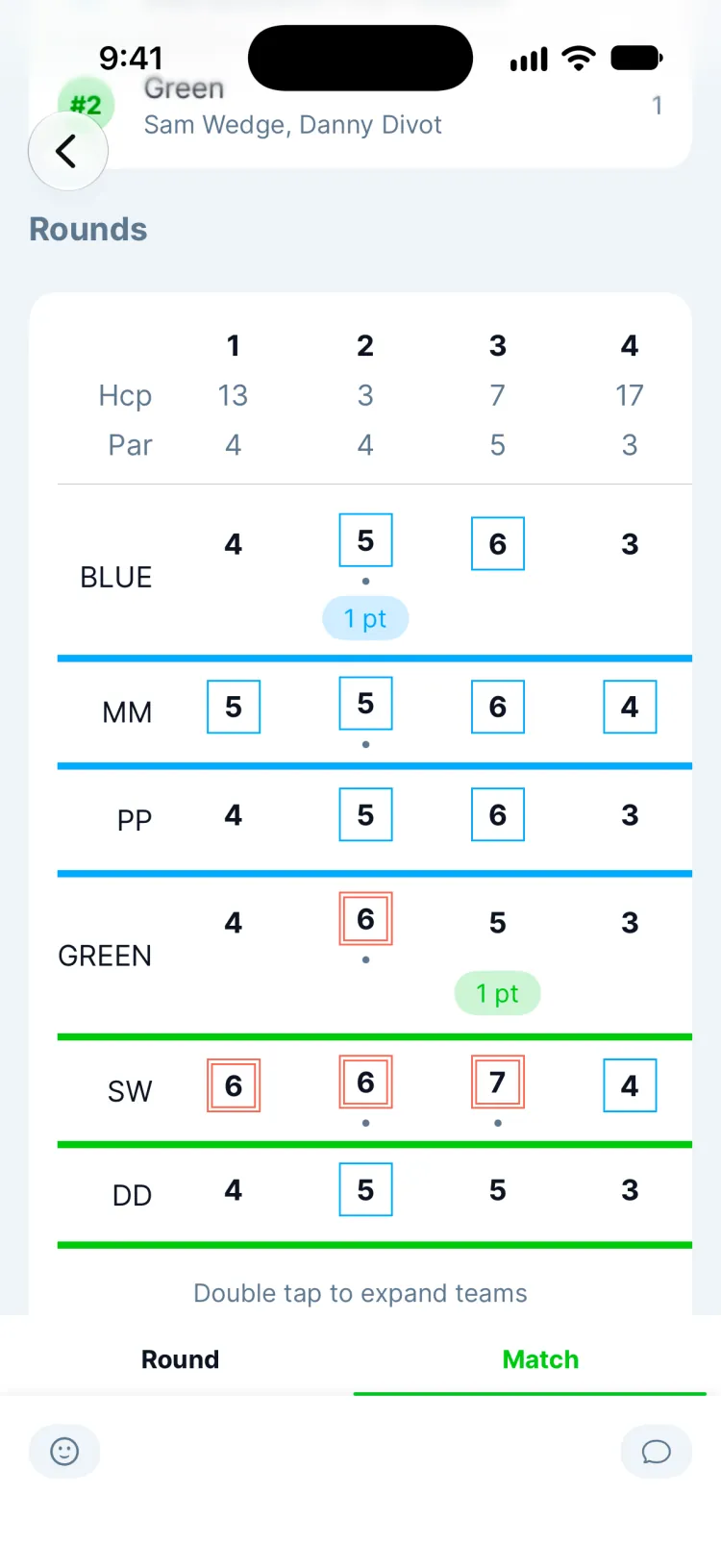
The Hcp row is each hole's handicap. A small dot under a score means that player gets a stroke on that hole (Show Legend says so too). In a team game, the team's best net score on each hole counts.
Updated November 13, 2026 by the Greens team.